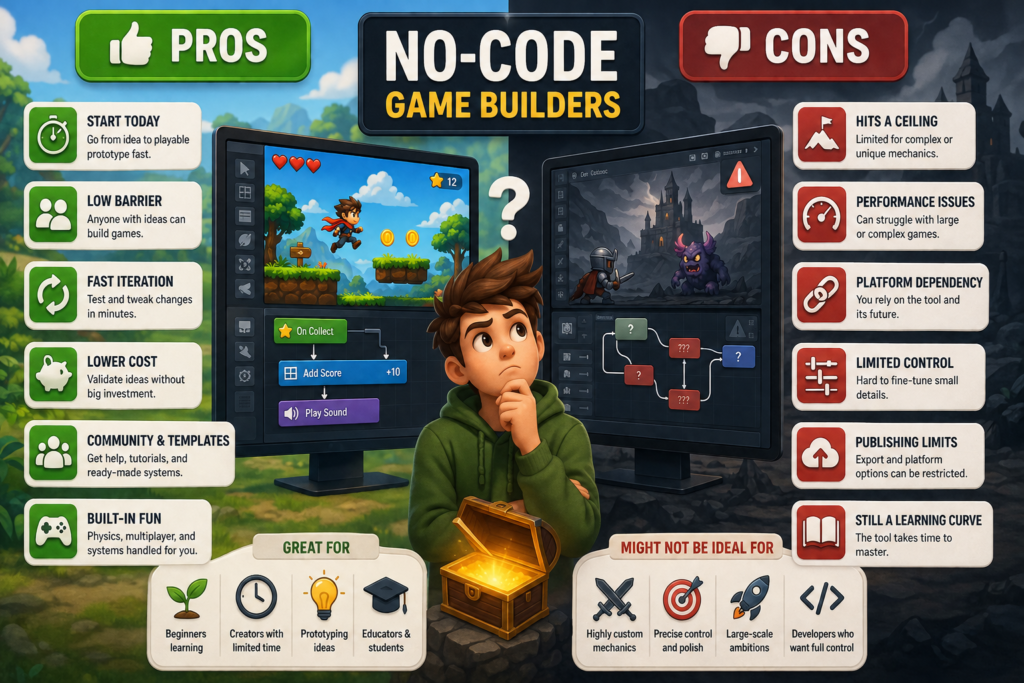
No-code game builders get pitched two very different ways depending on who you ask. Ask a marketing page and you’ll hear that anyone can build the next hit game in an afternoon. Ask a veteran developer and you might hear the opposite: that these tools are toys, fine for hobbyists but useless for anything serious.
The truth sits in the middle, and it’s more interesting than either extreme. No-code game builders genuinely changed who gets to make games, but they also come with real limitations that matter once your ambitions grow past a weekend project. Here’s an honest look at both sides.
What a No-Code Game Builder Actually Is
Before weighing pros and cons, it helps to be clear on what these tools do. A no-code game builder lets you create playable games through visual interfaces instead of writing code. You drag elements onto a screen, set rules through menus or logic blocks, and the platform translates your choices into a functioning game behind the scenes.
This isn’t the same as a simple template editor. Modern platforms handle physics, scoring systems, multiplayer syncing, and even branching logic, all without requiring you to understand what’s happening underneath.
The Pros
You Can Start Today, Not in Six Months
Learning to code well enough to build a functional game traditionally takes months of consistent practice. A no-code builder collapses that timeline dramatically. You can go from idea to a playable prototype in a single sitting, which matters enormously for creative momentum. Ideas lose energy the longer they sit untouched.
The Barrier to Entry Drops for Non-Programmers
Writers, artists, teachers, and people with strong creative instincts but no programming background finally have a way in. A great game idea used to require either learning to code or hiring someone who already knew how. Now the idea itself becomes the main asset again.
Faster Iteration Cycles
Because you’re not debugging syntax errors, changes happen faster. Want to test whether the game feels better with double jump enabled? Toggle it and playtest immediately. This kind of rapid iteration used to require a working knowledge of the codebase. Now it’s a matter of minutes.
Lower Cost for Testing Ideas
Not every game idea is worth months of development. No-code tools let you build a rough, playable version cheaply enough to find out if an idea is actually fun before committing serious time or budget. That validation step alone saves a lot of wasted effort.
Community and Template Support
Most popular no-code platforms have active communities, template libraries, and tutorials built around common genres. If you’re building a platformer or a puzzle game, chances are someone has already solved the exact problem you’re stuck on, and shared the solution.
Some Platforms Handle the Fun Part for You
A newer category of tools goes further than drag-and-drop logic. Game builder platforms let you describe a game concept in plain language and generate a working version from that description, which is a meaningfully different experience from manually wiring up every rule yourself. Games built this way, like Blaster Duels, show that AI-assisted, no-code approaches can still produce something genuinely playable and fun, not just a rough proof of concept.
The Cons
You Hit a Ceiling Eventually
This is the most common complaint from people who outgrow no-code tools. Visual builders are designed around common patterns and genres. The moment you want a mechanic that doesn’t fit the platform’s assumptions, you’re stuck. Custom physics behavior, unusual control schemes, or highly specific game feel often require code that the tool simply doesn’t expose.
Performance Can Suffer at Scale
Games built visually sometimes carry more overhead than hand-coded equivalents, especially as complexity grows. A small prototype runs fine. A game with hundreds of active objects, complex AI, and layered systems can start to show cracks, particularly on lower-end devices.
You’re Dependent on the Platform
If you build your entire game inside one no-code tool and that platform changes its pricing, shuts down, or deprecates a feature you rely on, you have limited recourse. Traditional code lives independently of any one company’s decisions. A no-code project often doesn’t.
Limited Control Over Fine Details
Experienced developers obsess over small details: exact jump arcs, frame-perfect input windows, subtle animation timing. No-code tools abstract these details away for the sake of accessibility, which is great for beginners but frustrating once you know exactly what you want and can’t quite get there through the available menus.
Exporting and Publishing Can Get Complicated
Not every no-code platform makes it simple to publish across multiple stores or formats. Some lock you into web-only distribution. Others require upgraded tiers to export to mobile app stores. It’s worth checking this before you’re deep into a project, not after.
Learning the Tool Still Takes Time
“No-code” doesn’t mean “no learning curve.” Every platform has its own logic, quirks, and interface conventions. You’re not learning a programming language, but you are learning a system, and that system can be just as confusing as code to a total beginner during the first few days.
Who No-Code Game Builders Are Actually Good For
Beginners Testing the Waters
If you’ve never built a game and want to know whether you even enjoy the process, no-code is a low-risk way to find out. Nothing beats hands-on experience for figuring out if game development is something you want to pursue further.
Solo Creators With Limited Time
If you have a day job and a game idea, a no-code tool might be the only realistic way to get something finished. Coding from scratch around a full schedule is genuinely hard. Visual tools compress that timeline significantly.
People Prototyping Before Hiring a Developer
Founders and small studios sometimes use no-code builders to prove out a concept before investing in a full custom build. A working prototype makes conversations with developers or investors far more concrete than a written pitch ever could.
Educators and Students
Classrooms use no-code game builders to teach logic, sequencing, and design thinking without requiring students to learn syntax first. The concepts transfer later if students move on to traditional coding.
Who Might Want to Skip It
If you already have a specific, technically demanding vision, precise physics, custom rendering, unusual genre mechanics, you’ll likely hit the platform’s limits faster than you’d like. In that case, learning the fundamentals of a real engine, or partnering with someone who already knows one, tends to pay off faster than fighting against a tool that wasn’t built for your use case.
Finding the Middle Ground
A growing number of creators use no-code tools specifically for prototyping, then transition to custom code once an idea proves itself. This hybrid approach captures the speed benefits of no-code without getting boxed in long-term. Build fast, test the concept, and decide afterward whether the idea deserves a fully custom build.
Others stay in the no-code ecosystem permanently and simply choose platforms that match their genre and ambitions closely enough that the limitations rarely matter. For casual games, social experiences, and quick multiplayer titles, that’s often a perfectly reasonable place to stay.
Final Thoughts
No-code game builders aren’t a replacement for traditional development, and they were never meant to be. What they offer instead is a genuinely useful starting point: a way to test ideas, build momentum, and get something playable in front of real people without a six-month runway.
The right move isn’t choosing a side in the no-code versus code debate. It’s understanding what each approach is actually good for, and picking the one that matches where your project is right now. For a lot of first-time creators, that starting point looks a lot like a no-code tool, and that’s exactly as it should be.