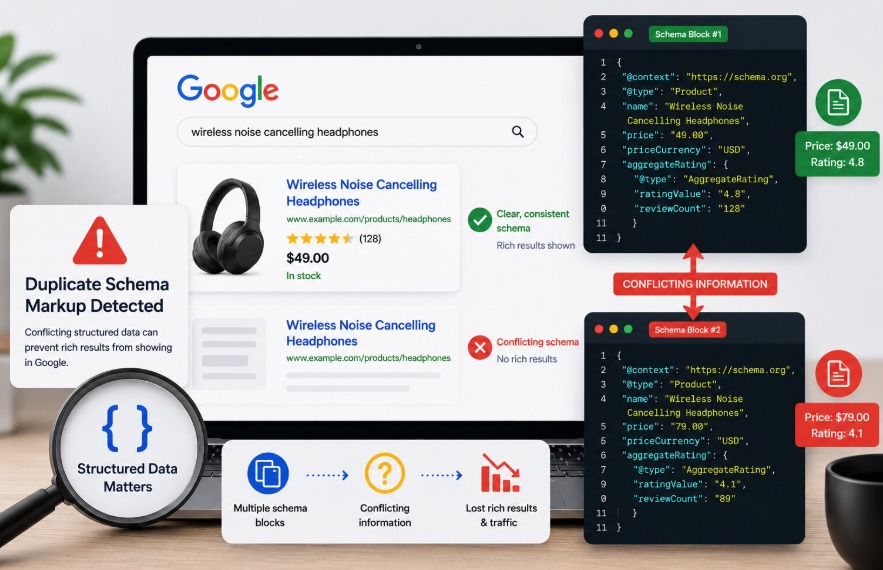
Structured data is one of the few SEO investments that pays off in a measurable, visible way. Get it right, and your listings show star ratings, pricing, FAQs, and breadcrumbs directly in search before anyone even clicks. Running a schema markup validator regularly helps identify hidden structured data issues before they affect your rich results. Get it wrong, and those enhancements disappear, often with no clear error message explaining why.
Duplicate schema markup shows up across ecommerce stores, SaaS sites, and content-heavy blogs alike, usually without anyone on the team realizing it’s there. And because it rarely triggers an obvious alert, it can suppress rich results for months before anyone investigates.
The Problem Nobody Thinks to Check For
Here’s how a duplicate schema typically gets onto a page: a Shopify theme generates its own Product schema automatically. Then the store installs an SEO app that also outputs Product schema, more complete, with reviews and pricing. Then a developer manually adds a third JSON-LD block to include fields the app doesn’t support. Three separate Product schemas on every single product page, each with slightly different values, and nobody on the team knows because it’s all happening in the background.
WordPress does the same thing. The theme has built-in structured data. A schema plugin adds a third. Webflow and Squarespace aren’t immune either, platform-level schema coexists with whatever’s been added in custom code blocks.
Platform migrations make this worse. When a site moves from one CMS to another, old schema implementations rarely get cleaned up completely. New markup gets added while old markup survives in leftover templates or platform defaults. The result is a page that looks fine on the surface but is sending Google contradictory information underneath.
What Happens When Google Finds Two Conflicting Schema Blocks
Google doesn’t error out when it finds duplicate structured data. It tries to process what’s there, which is actually part of the problem.
When two Product schemas on the same page agree on everything, such as the same name, same price, same availability, Google can usually handle it. The redundancy is wasteful but not necessarily damaging.
The issue is when they don’t agree. One block says the product is $49, the other says $79. One block has an AggregateRating of 4.8, the other has 4.1. Google now has to decide which one is accurate. In most cases, rather than guess, it declines to show rich results at all. There’s no notification. Google Search Console might flag that structured data was detected but show no rich result eligibility, and the reason listed is usually something vague like “items not eligible.”
That ambiguity is what makes duplicate schema so frustrating to diagnose. The page has structured data. The JSON is valid. Required properties are present. But the results page shows a standard blue link while competitors are showing star ratings, pricing, and review counts.
Why This Hits Ecommerce Sites Hardest
The scale factor is what makes duplicate schema especially damaging for ecommerce. When the duplication lives in a product page template, it’s affecting every product page simultaneously.
Ecommerce rich snippets, the ones showing price, availability, and star ratings in search results, are directly tied to Product schema accuracy. Google has grown stricter about requiring that structured data values match what’s visible on the page. When two schema blocks present different prices or different ratings, Google treats that as a content mismatch, and the page loses rich result eligibility across the board.
The traffic impact from losing those snippets is real. Adding Review schema to product pages increased organic traffic by 20%, which gives a rough sense of what well-functioning structured data is worth. Duplicate schema that suppresses those results is essentially leaving that traffic on the table.
The Validation Gap Most Teams Miss
Running a page through a schema markup validator and getting a green checkmark means the JSON is syntactically valid and the required properties are present. Standard validators check each block in isolation. They don’t automatically flag the existence of a second conflicting block elsewhere on the page, especially if both blocks pass validation on their own. This is exactly where duplicate schema hides.
A proper audit means checking how many application/ld+json script tags exist on the page in total. Every instance needs to be accounted for: the theme, the SEO plugin, the tag manager container, the custom code block, the platform’s built-in defaults. A schema markup validator is only useful if it’s being asked the right question, and “is this one block valid?” is a different question from “is this page’s structured data coherent?”
Structured data must match what users see on the page, and it must be consistent.
How to Find and Fix Duplicate Schema
Finding it is straightforward once you know where to look. View the page source and search for every instance of application/ld+json. Each script tag with that type is a separate schema block. If the same @type appears more than once, two Product blocks, two Organization blocks, then note the source of each one.
Tracing the source is the more involved part. Schema gets injected from a lot of places: theme files, SEO plugins, tag manager, custom code in the page header or footer. Each source needs to be identified before deciding what to remove.
Each duplicate block usually contains at least one property the others are missing, so simply removing one risks losing useful data. The better approach is picking the most complete block as the foundation, pulling any unique properties from the others into it, then disabling every other injection source.
After consolidation, re-validate across a representative set of pages. Templated sites replicate duplication at scale, and the fix needs to be confirmed at scale too.
For teams managing schema across hundreds or thousands of pages, doing this manually after every site change isn’t sustainable. Tools like JSON Schema App handle this by centralizing structured data management, so plugins and themes can’t silently inject competing schema alongside what’s already deployed.
Google’s Direction Makes This More Important, Not Less
It’s worth understanding where Google is heading with structured data, because it makes duplicate schema more consequential, not less. Google continues to place greater emphasis on accurate, consistent structured data through evolving rich result requirements and AI-powered search experiences.
Duplicate markup runs directly against that direction. As structured data plays a larger role in AI search features and Knowledge Graph entries, having conflicting signals on a page becomes a harder problem to recover from.
Frequently Asked Questions
1. Does duplicate schema always prevent rich results?
Not always. When duplicate blocks carry identical values, Google can often process them without suppressing rich results. The issue is specifically when values conflict with different prices, ratings, or names, which forces Google to either pick one arbitrarily or decline to show enhanced results.
2. How do I find all schema blocks on a page?
View the page source and search for application/ld+json. Each instance is a separate schema block. Also check your CMS theme, SEO plugins, tag manager containers, and any custom code in the page header.
3. Is duplicate schema the same as duplicate content?
No. Duplicate content refers to repeated page copy across multiple URLs. Duplicate schema is a structured data implementation issue within a single page. They’re separate problems with separate fixes.
4. How often should structured data be audited?
After any significant site change – theme updates, plugin installs, platform migrations, pricing changes, or redesigns. For ecommerce sites with templated pages, regular automated monitoring is more reliable than periodic manual checks.
5. What’s the safest way to consolidate duplicate schema?
Identify all injection sources, use the most complete block as the base, migrate unique properties from the others into it, then disable every other source. Re-validate a representative sample of pages after the fix to confirm nothing has been re-injected.